What this short guide covers: quick dates and deadlines, step-by-step login directions, simple strategy tips, and how to avoid fake portals. You can jump straight to the part you need.
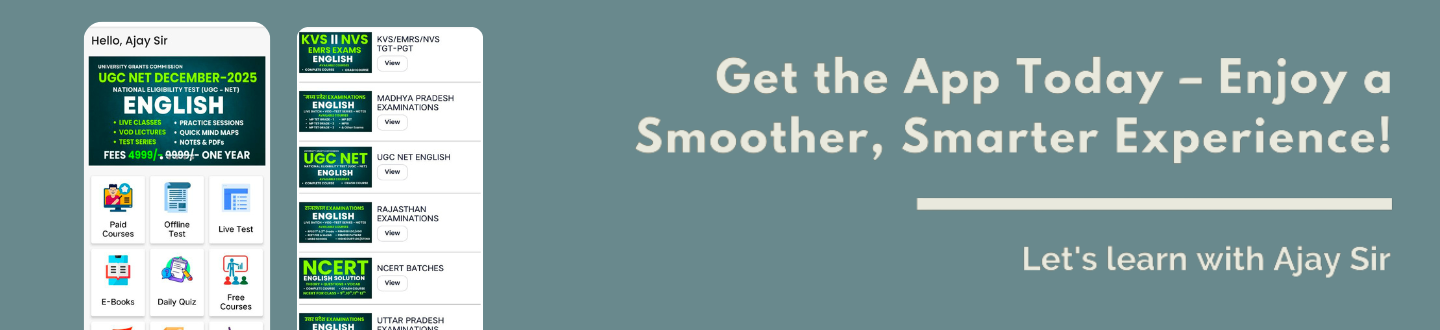
The key action is clear: submit your Option-cum-Preference via Candidate Login on the official website between 09–12 March, with the deadline at 6:00 PM.
Read on and you’ll get a practical, how‑to write for you so you can complete the process confidently
Quick Overview
SSC CGL Post Preference Online Form 2026: Overview
Your ordered choices decide which vacancies you may be matched to when results are processed. The option-cum-preference links your rank to the list of departments you pick.
Option-cum-Preference and the merit-cum-preference basis
Merit-cum-preference means the staff selection will consider your score first, then your ordered choices. You can only be allotted a vacancy you actually picked. Higher merit gets earlier consideration for each post.
Who must submit it
If you appeared in Tier‑II of the combined graduate level exam cycle, you must submit this selection window. It is mandatory for all such candidates listed by the selection commission.
What happens if you don’t submit
If you miss the 09–12 March window (up to 6:00 PM), you will not be considered for final selection. The staff selection commission will not entertain grievances or reopen the window.
- Act early: complete your choices soon after the window opens.
- Order carefully: you will only get posts you select, in the order you give.
Keep proof: save the confirmation for future reference.
Eligibility Criteria
SSC CGL Post Preference Online Form 2026: Eligibility and age limits by post
Check eligibility and age bands first so you do not waste high‑ranked choices on posts you cannot be allotted. A short verification will save your rank and avoid disappointment later.
Baseline rule: the common requirement is a bachelor degree in any stream from a recognised university. That is the minimum eligibility for most vacancies in the ssc cgl cycle.
Post‑specific academic rules
Certain posts carry extra conditions. For example, Junior Statistical Officer needs either a bachelor degree with statistics or a bachelor degree plus at least 60% in Maths at 12th level.
Statistical Investigator Grade‑II requires a bachelor degree with Statistics as a subject. Verify these details in the official notification before you order your list.
Age bands and why they matter
Age limits (as on 01‑08‑2025) vary by post: common bands include 18‑27, 18‑30, 20‑30 and 18‑32. If your age falls outside the band for a post, that post cannot be allotted to you even if you rank it highly.
- Filter out posts you are ineligible for before making your final list.
- Create a “safe” list: eligible posts first; aspirational ones only if you clearly meet criteria.
- Read the official notification or corrigendum if any detail is unclear.
|
Item
|
Why check
|
Where to confirm
|
|
Bachelor degree
|
Baseline eligibility
|
Application profile / notification
|
|
Subject-specific rule
|
JSO / Statistical Investigator requirements
|
Official notification
|
|
Age band
|
Blocks allotment if outside limit
|
Notification and corrigendum
|
All Details
Before you start: details and documents to keep ready
Have your key items ready so you can complete the process in one sitting. This reduces risk of timeout and helps you make clear, final selections.
Login essentials
Keep your registration or roll number and password within reach. Some screens let you verify with enrolment or Date of Birth if needed.
Personal details checkpoints
Confirm your name spelling and date of birth match the records in your application dashboard. A quick check prevents mismatches later.
Eligibility proof basics
Ensure your minimum qualification — a bachelor degree from a recognized university — is documented and meets any post-specific rules.
- Prepare a ready list so you don’t pause during peak access times.
- Have login credentials and Date of Birth handy for verification prompts.
- Keep admit card details and application acknowledgement for quick cross-checks.
- Open your dashboard to confirm application status before you proceed.
|
Item
|
Why it matters
|
Where to find it
|
|
Registration / Roll No.
|
Needed for sign‑in and verification
|
Registration email / acknowledgment
|
|
Name & DOB
|
Must match official records
|
Application profile / admit card
|
|
Bachelor degree
|
Minimum eligibility proof
|
Degree certificate / university portal
|
|
Application status
|
Confirms correct cycle and access rights
|
Candidate dashboard
|
SSC CGL Post Preference Online Form 2026: How to fill Post Preference & Online Form
Follow this step‑by‑step guide to enter your ranked choices correctly and confidently. Start with a clear list of what matters most: job profile, pay level and location.
Selecting posts and departments in your priority order
Begin by choosing your top five choices. Expand the list to include all acceptable departments so you don’t leave gaps that limit allotment.
Entering post codes correctly and avoiding mismatches
Type each code exactly as shown in the recruitment interface. Double‑check department names beside codes to avoid selecting the wrong unit.
Reviewing your choices before you click ‘SUBMIT’
Read every line in order. A single swap can change your final posting. Confirm the sequence and spelling before submission closes at 6:00 PM on the final day.
Saving proof: printout and confirmation for future reference
After successful submission you will see an on‑screen acknowledgement. Download or print that page and keep the file or hard copy for verification and records.
- Tip: keep an offline copy of your final list so you can re‑enter quickly if the site lags.
|
Action
|
Why it matters
|
Where to check
|
|
Enter codes
|
Prevents mismatch
|
Recruitment preference interface
|
|
Final review
|
Locks your order
|
Confirmation screen
|
|
Save proof
|
Evidence for records
|
Downloaded acknowledgement
|
SSC CGL Post Preference Online Form 2026: job, pay level, and career fit
Choose wisely: your ranked list shapes both daily work and long‑term career movement. Think beyond titles and match options to tasks you enjoy and can perform well.
Job profile and responsibilities across departments
Look at actual duties for each department. Some roles are desk-based; others require field visits or inspections. Pick roles that fit your skills and routine.
Pay scale levels and what as per rule means
Posts map to pay levels (commonly Level-4 to Level-8). As per rule means the official pay matrix applies and allowances vary by city. Factor in in-hand pay, not just basic pay.
Location, mobility and work-life balance
Consider transfer norms: some roles involve India-wide movement, others stay local. Field roles often demand irregular hours; desk roles usually offer steadier schedules.
- Match your top choices to daily tasks, not only to prestige.
- Balance ambition with realistic eligibility and lifestyle needs.
- Think long term: promotion prospects, exposure, and transfer patterns matter.
|
Factor
|
What to check
|
Impact on career
|
|
Job profile
|
Daily duties and skills required
|
Affects job satisfaction and performance
|
|
Pay level
|
Official level and city allowances
|
Determines take-home and living standard
|
|
Location
|
Posting scope and transfer frequency
|
Influences family planning and stability
|
|
Growth
|
Promotion paths and departmental exposure
|
Shapes long-term prospects and mobility
|
SSC CGL Post Preference Online Form 2026: Popular SSC CGL posts
Different departments offer distinct routines; choose roles that match your skills and life plans. The list below gives a compact, role-by-role view so you can make informed choices.
Inspector tracks (CBDT / CBIC)
Typical work: assessments, compliance checks, audits and field inspections. You’ll handle documentation, taxpayer interaction and departmental procedures.
Assistant Section Officer style roles
Departments: CSS, MEA, Railways, Intelligence Bureau, AFHQ. These jobs focus on noting, drafting, file work and coordination across units.
Audit and accounts roles
Examples: Assistant Audit Officer, Assistant Accounts Officer, Auditor, Accountant. Expect structured tasks, ledger work and periodic audits—ideal if you favour process-driven duties.
Investigation & enforcement roles
Roles: Sub‑Inspector (CBI/NIA) and Assistant Enforcement Officer. These involve case-based work, field enquiries and close coordination with legal teams.
- Tip: match each role’s reality to your long‑term goals, not just its popularity.
|
Role group
|
Key tasks
|
Typical departments
|
Best fit if you like
|
|
Inspector
|
Assessments, inspections, compliance
|
CBDT, CBIC
|
Field work and regulations
|
|
Assistant Section Officer
|
Note‑making, file management, coordination
|
CSS, MEA, Railways, IB, AFHQ
|
Administrative and drafting tasks
|
|
Audit & Accounts
|
Audit cycles, accounts, reporting
|
Comptroller offices, audit wings
|
Structured, numbers-focused roles
|
|
Investigation / Enforcement
|
Casework, raids, legal liaison
|
CBI, NIA, Enforcement directorates
|
High field exposure and investigations
|
SSC CGL Post Preference Online Form 2026: PwBD candidate guidance
If you have a benchmark disability, always confirm suitability before you lock in choices. Only select roles listed as suitable for your specific benchmark disability in the official documents. This protects your candidature and reduces the risk of later rejection.
Choose only posts identified as suitable
Be strict: pick from the list that matches your benchmark disability. Refer to Annexure‑V so you select correctly. The corrigendum dated 05 March 2026 updates which roles allow which disabilities; check it now.
Why unsuitable selections can lead to cancellation
If you pick a post not marked suitable, the concerned user department may cancel your candidature later. Even a high merit does not override suitability rules set by the departments and the staff selection commission.
Check the corrigendum and verify details before submit
Do not rely on social posts or third‑party lists. Use the official notification and corrigendum for final information. Finalise preferences early so you have time to correct any mistakes within the live window.
- Only choose posts listed as suitable for your benchmark disability in Annexure‑V.
- Confirm the corrigendum (05 March 2026) and the main notification for exact details.
- Keep printed or digital proof of the suitability pages you used to make choices.
SSC CGL Post Preference Online Form 2026: Editing, revising, and finalising
Know the live window: edits to your option list are allowed only from 09 March (from 6:00 PM) until 12 March (up to 6:00 PM). Treat these dates and this time as absolute. Outside that span you cannot change your choices.
Revisions allowed only within the live window
While the portal is open, you may edit your entries as often as you need. Use that flexibility to refine order, correct codes or swap departments. Work calmly — the system records the latest save.
The last saved submission is treated as final after the deadline
Practical tip: adopt a “submit early, review again” method. Make an initial correct submission soon after the window opens, then revise if you spot improvements later.
SSC CGL Post Preference Online Form 2026: Common mistakes to avoid
A single missed deadline can remove even top-ranked candidates from final consideration. The selection portal is strictly time-bound; non-submission within 09–12 March (up to 6:00 PM) means no further chance. Act early to avoid this permanent loss.
Missing the deadline and losing merit-list consideration
Plan a two-stage approach: submit once early, then revise if needed. Set alarms and use a reliable network to avoid last-minute failures.
Wrong order of preferences and accidental low-priority allotment
Rank thoughtfully. A misplaced choice can push you into a lower-priority post despite a strong rank. Make an offline list before you enter data.
Selecting posts outside your eligibility (age/qualification)
Check your age band and bachelor degree requirements first. Remove any role you clearly do not meet to protect higher slots for eligible options.
Not saving confirmation or taking a printout
Always download and print the on-screen acknowledgement. This proof is vital if you need to show what you submitted.
- Run a 90-second checklist: eligibility, order, codes, final save, download.
- Keep screenshots and a printed copy in your records.
Conclusion
Finish strong: submit your final ranked choices via Candidate Login on ssc.gov.in between 09–12 March, before 6:00 PM, so you remain in merit consideration for the ssc cgl process.
Treat your list as a career decision. Review eligibility, job profile and mobility before you save. A careful order helps convert rank into the right post.
Do it now: log in → open My Application → enter preferences → review → submit → save the confirmation PDF.
Use only the official website and avoid last‑minute rushes that cause errors. Track the answer key, notices and results so your overall ssc cgl 2026 selection process stays smooth and documented


![EMRS PGT [Tier-2] ENGLISH - 2025](https://letslearnwithajaysir.s3.ap-south-1.amazonaws.com/courses/FsnKxIFpiLxbRD418g6vo7AsLy0ge7IP7Iu2fsJY.webp)
![EMRS TGT [Tier-2] ENGLISH - 2025](https://letslearnwithajaysir.s3.ap-south-1.amazonaws.com/courses/BjLXVqVV1SeZKnhYjmPZpz2jQ7r02kS73pGGOLrL.webp)
![KVS/NVS PGT ENGLISH [Tier-2] - 2025](https://letslearnwithajaysir.s3.ap-south-1.amazonaws.com/courses/vqli598KWrKnm4txcsZh5qjMN9UMAX8LvFk9IiF0.webp)
![KVS/NVS TGT ENGLISH [Tier-2] - 2025](https://letslearnwithajaysir.s3.ap-south-1.amazonaws.com/courses/pxC2WhfYKuyaoGqvcTvhTBL2Y44o3TNA0z8NYRB5.webp)