Did you know that nearly one in five applicants check their recruitment status within the first hour of an announcement? That rush can cause confusion and mistakes when you need clear, verifiable information.
You will also see the exact recruitment identifier to match so you do not confuse this outcome with other bihar police listings online. Prepare your credentials, a stable connection and access to the official website before you download anything.
Guidance here is written for you as a candidate in India and relies on official sources only. This keeps you from following forwarded PDFs or unverified links and helps you confirm your selection status without guesswork.
Key Takeaways
- Use this page for a fast, secure check of your application status.
- Know the difference between prelims, mains, PET and the final result.
- Match the recruitment identifier exactly to avoid confusion.
- Keep credentials ready and use a stable internet connection.
- Always verify updates on the official website to confirm your selection.
Quick Overview
BPSSC Bihar Police Enforcement SI Final Result 2026: Latest update
Get the confirmed publication date and key context for the recruitment notice in one place. This helps you avoid rumours and focus on the official announcement.
Final Result Available date and official announcement
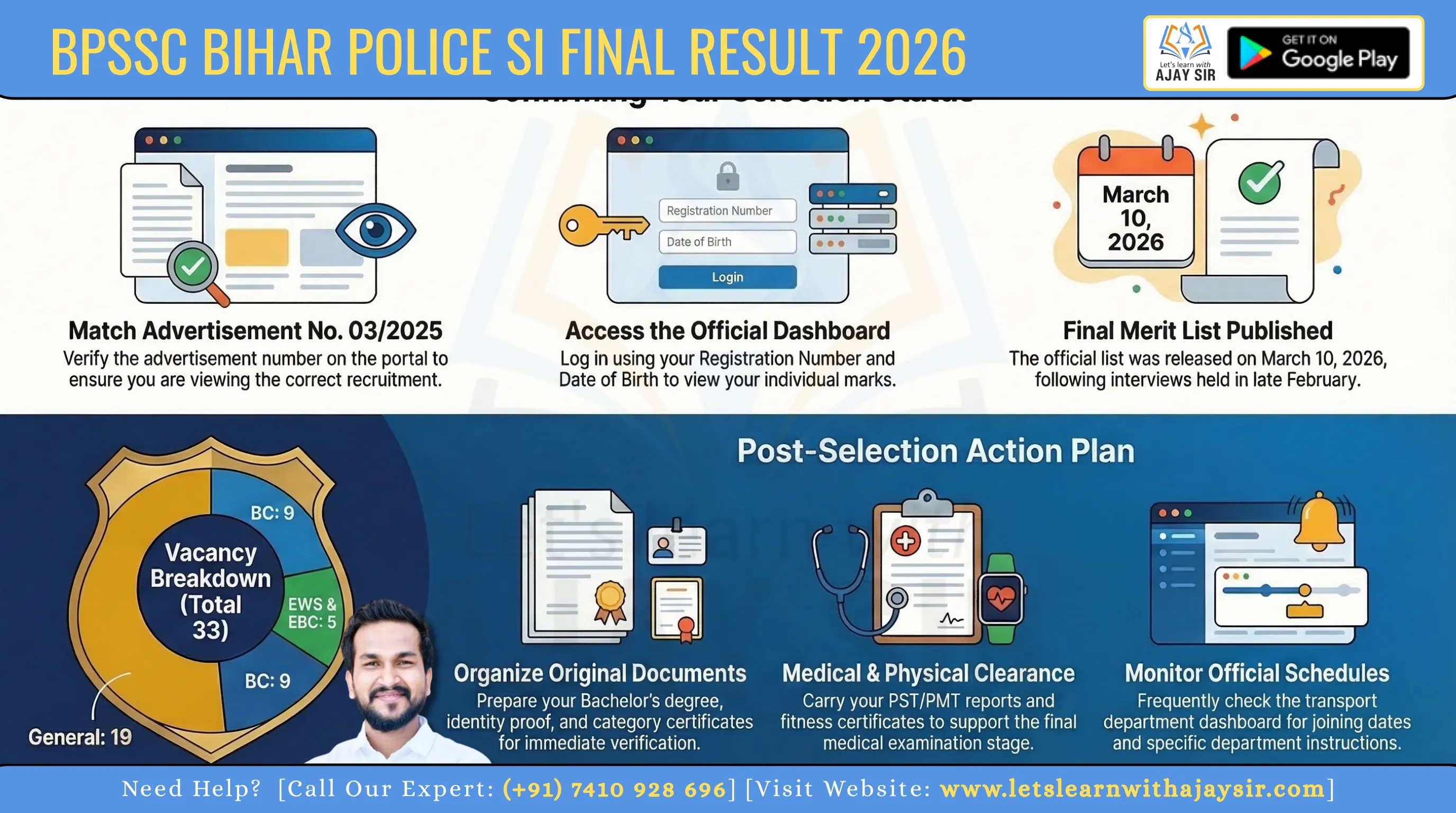
The commission issued the final list on 10 March 2026 after interviews held from 24–27 February 2026. You should use the official notice and not rely on forwarded files.
Recruitment overview for Enforcement Sub Inspector in Transport Department
The vacancy covers the Transport Department for the post of sub inspector. The notice summarises selection steps and which department’s dashboard shows the outcome.
Advertisement reference you should match: Advt No. 03/2025
Always match the advertisement number Advt No. 03/2025 before you open any download link. This prevents confusion when multiple notifications appear.
- Check the official announcement date first to confirm authenticity.
- Keep your application details ready before viewing the dashboard.
- Identify the correct PDF by post name and advertisement number.
|
Item
|
Detail
|
Why it matters
|
|
Publication date
|
10 March 2026
|
Confirms when the list became official
|
|
Interview window
|
24–27 February 2026
|
Explains timeline between interview and publication
|
|
Advt. reference
|
Advt No. 03/2025
|
Use to match the correct notice
|
Eligibility Criteria
BPSSC Bihar Police Enforcement SI Final Result 2026: Eligibility snapshot
A quick review of age, education and physical standards helps you spot mismatches early. Confirm these basics now so your selection status matches what you must prove at verification.
Age limit and relaxations (as on 01 August 2025)
Minimum: 21 years.
Maximum: 37 years for males and 40 years for females. Relaxation applies as per standard recruitment rules for reserved categories, so check your category-specific allowance.
Educational qualification
You must hold a Bachelor’s degree from a recognised university. Keep the original degree certificate and mark sheets ready as supporting document proof.
Physical standards
Height requirements: minimum 165 cm for males and 150 cm for females.
Chest (males): minimum 79–84 cm (with expansion specified in the notification). Ensure you have medical records if measurements may need clarification.
- Re-check basics: Match your age, education and physical data with the notice before heading to verification.
- Prepare documents: Keep birth proof, degree certificate and category documents ready to avoid delays.
- Why it matters: If your status shows as selected, any mismatch at verification or medical stages can delay or cancel appointment.
|
Item
|
Requirement
|
Tip
|
|
Age (01 Aug 2025)
|
21–37 (male); 21–40 (female)
|
Carry DOB proof matching application
|
|
Education
|
Bachelor’s degree
|
Original certificate + photocopies
|
|
Physical
|
Height & chest as stated
|
Get pre-check measurements if unsure
|
Vacancy Details
BPSSC Bihar Police Enforcement SI Final Result 2026: Vacancy details
The vacancy summary below helps you judge competition and set realistic expectations. It shows how many posts were available and how the category split affects selection.
Total posts and category-wise breakup
Total posts: 33.
Category distribution as notified:
- General — 19
- EWS — 3
- EBC — 2
- BC — 9
- BC Female — 0
- SC — 0
- ST — 0
What category allocation means for your merit and selection
Your merit position interacts directly with category vacancies. The same marks can lead to different outcomes depending on how many posts a category has.
If you see zero posts for a category, it means no openings were reserved for that group in this cycle. This affects the cut-off and reduces chances of selection for those categories this time.
Always check that the category shown on the published list matches the one you applied under. If you find a mismatch, follow the commission's correction guidance immediately.
|
Item
|
Count
|
Why it matters
|
|
Total vacancies
|
33
|
Frame your competition level
|
|
Category split
|
General 19; EWS 3; EBC 2; BC 9; Others 0
|
Determines reserved seats and cut-offs
|
|
Category impact
|
Varies by post
|
Same marks ≠ same selection across categories
|
Selection Process
BPSSC Bihar Police Enforcement SI Final Result 2026: Selection process stages
Understand the full selection pipeline so you can judge where your name fits in the final list. The procedure uses successive filters to narrow candidates from many to the appointed few. Below are the main stages and what each checks.
Pre exam and mains pathway
The pre exam acts as the first filter. Clear the pre to reach the mains examination. The mains is a detailed written test that weighs subject knowledge and application.
PST/PMT and PET expectations
PST/PMT verify physical standards like height and chest. PET checks fitness and endurance. Passing these is essential even after written stages.
Document verification and medical examination
Document verification confirms your identity, education and category proofs. Any mismatch can cancel your selection. A medical exam follows to certify fitness for duty.
How the interview fits in
The interview was conducted from 24–27 February 2026. It forms part of the final assessment and can influence merit if marks are awarded at that stage.
|
Stage
|
What it tests
|
Why it matters
|
|
Pre exam
|
Basic eligibility and aptitude
|
First cut to shortlist candidates
|
|
Mains examination
|
Detailed written knowledge
|
Major weight in final ranking
|
|
PST/PMT & PET
|
Physical standards & fitness
|
Ensures field readiness
|
|
Document & medical
|
Identity, certificates, health
|
Final clearance before appointment
|
All Details
BPSSC Bihar Police Enforcement SI Final Result 2026
The portal shows two common formats so you won’t be confused by the interface.
What you will see in the dashboard and PDF
When you log in, the page redirects to a secure dashboard. You enter your Registration Number, Date of Birth, Gender and Verification Code to view or download the file.
Alternatively, the commission may publish a notice-style pdf that lists roll numbers and statuses. Use search (Ctrl+F) to find your entry quickly.
How to confirm your selection status quickly
- Look for your roll or registration number, selection status and any remarks.
- Check if marks and the merit list column appear; some dashboards show status only at release.
- If information is partial, follow the transparency notice link on the portal for clarifications.
- Final checklist: match name, registration number and post before saving the file.
|
Item
|
Where
|
Why
|
|
Registration/roll
|
Dashboard / PDF
|
Identifies you
|
|
Status & marks
|
Dashboard / PDF
|
Shows selection and scores
|
|
Remarks
|
Notice area
|
Next steps or corrections
|
BPSSC Bihar Police Enforcement SI Final Result 2026: How to download result online
A few clear steps on the notice page will take you from link to downloadable file fast.
Start at the Important Links area on the commission website. Click the labelled “Download Final Result” link and you will be redirected to a secure dashboard.
Details you must enter
On the dashboard, enter your Registration Number, Date of Birth, Gender and the Verification Code shown. These exact details match the ones on your admit card and application.
Step flow from Important Links to the dashboard
- Open Important Links on the commission notice page.
- Choose “Download Final Result” and allow the redirect.
- Complete the form fields and submit to download the PDF from the website.
Troubleshooting common login and download issues
If the captcha fails, refresh the page and retype the code carefully. Check DOB format if details are rejected; use the same format shown on your admit card.
For heavy traffic, try off-peak hours, change browsers or use a different network. Do not enter unrelated credentials; re-verify your registration number from your records.
How to save, print and store your document safely
- Download the PDF and rename it with your registration number for easy retrieval.
- Keep copies on your phone and computer, and upload one secure copy to cloud storage.
- Print a clean copy for verification; include the full URL and date in the header if required for proof.
|
Action
|
Why
|
Tip
|
|
Download PDF
|
Official proof of status
|
Rename file with registration number
|
|
Save copies
|
Backup for verification
|
Store on phone, PC and cloud
|
|
Print
|
Hard copy for joining
|
Show URL and date on printout
|
BPSSC Bihar Police Enforcement SI Final Result 2026: merit list, marks, and your final ranking
Read this short guide to spot your name, see your score and know what to do next. The documents are usually simple to follow if you know where to look.
How merit lists are structured
Merit lists often sort candidates by category and merit position. You will find roll or registration numbers, name initials and category columns first.
Serial numbers show rank; the list may use a separate column for merit order so you can confirm your place easily.
Where marks appear and transparency notices
Marks may show in your dashboard, inside a downloadable PDF, or in a distinct obtained-marks notice on the portal.
If a transparency notice exists, it usually publishes obtained marks separately for clarity.
Interpreting your qualifying status and next steps
If your name appears with "selected", prepare documents for verification. If marked "shortlisted", wait for the scheduling note with further instructions.
If you are "not selected", download available score sheets for record and review. Always match Advt No. 03/2025 on every notice to avoid mixing lists from other recruitments.
|
Where
|
What appears
|
Action
|
|
Dashboard
|
Roll, status, marks
|
Download & save
|
|
PDF / notice
|
Merit list, category rank
|
Verify name & no.
|
|
Obtained-marks notice
|
Detailed marks per stage
|
Keep for queries
|
BPSSC Bihar Police Enforcement SI Final Result 2026: What to do after you check your final result
Seeing your status online is just the start; follow a clear routine to complete all post-publication formalities. This short guide gives practical, step-by-step information so you do not miss any official instruction.
If you are selected: preparing for appointment and joining formalities
Organise originals and photocopies of your identity, education and category certificates. Keep them filed by type so verification moves quickly.
Monitor the commission website for joining schedules, department instructions and any additional verification notices. Note dates and keep printable copies.
If you are not selected: what you can still download and keep
Download the final list, notice PDFs and any score disclosures for your records. These documents help with future queries or review requests.
Store one copy on your device, another in cloud storage and a printed version. This makes it easy to retrieve required details during later applications.
- You will get a practical next-steps plan to follow after checking the page.
- Keep a single folder for all post-publication documents and correspondence.
- Retain proof of publication date and advertisement reference for transparency.
BPSSC Bihar Police Enforcement SI Final Result 2026: Documents verification Checklist
Gather the papers listed below so you can move quickly when verification is scheduled. A small, organised pack saves time and reduces stress on the day.
Identity, education and category certificates
Carry original identity proof and multiple self-attested copies. Include your passport-size photo and any government ID that matches the details you used online.
Keep your Bachelor’s degree and mark sheets together. Include any category certificate you applied under; mismatched records can delay your appointment.
Physical and medical-related documents you may be asked for
Bring fitness certificates, PST/PMT reports and any prior medical records. These items support the physical checks and the medical exam required for the inspector post.
Store all paper and scanned copies in one folder so you can hand them over to verification staff without fumbling.
- Pack originals and several copies, organised by type.
- Label pages with your registration or roll number.
- Keep an extra set of passport photos and ID proof.
- Carry sealed medical reports if already obtained.
- Use a sturdy folder or document holder for travel.
|
Group
|
What to include
|
Why
|
|
ID
|
Photo ID, passport-size photos
|
Identity verification
|
|
Education
|
Bachelor’s degree, mark sheets
|
Qualification proof
|
|
Medical
|
Fitness certificate, prior reports
|
Medical clearance
|
Conclusion
Quick recap: confirm the published notice on the official website, match the advertisement No. 03/2025 and download the authenticated PDF to your device.
Open the commission portal, click the correct link, enter your registration number and DOB carefully, then save and rename the file for easy retrieval.
Keep your timeline and documents ready. Post-publication steps often move quickly after the exam cycle ends, so organise originals and copies in advance.
Final caution: avoid unofficial PDFs and verify every notice by matching the advertisement number, post name and publication details before you act.
Quick answers: Is the result out? Check the official website. Where to check it? Use the commission portal. What next? Download, store and await verification or joining notices.


![EMRS PGT [Tier-2] ENGLISH - 2025](https://letslearnwithajaysir.s3.ap-south-1.amazonaws.com/courses/FsnKxIFpiLxbRD418g6vo7AsLy0ge7IP7Iu2fsJY.webp)
![EMRS TGT [Tier-2] ENGLISH - 2025](https://letslearnwithajaysir.s3.ap-south-1.amazonaws.com/courses/BjLXVqVV1SeZKnhYjmPZpz2jQ7r02kS73pGGOLrL.webp)
![KVS/NVS PGT ENGLISH [Tier-2] - 2025](https://letslearnwithajaysir.s3.ap-south-1.amazonaws.com/courses/vqli598KWrKnm4txcsZh5qjMN9UMAX8LvFk9IiF0.webp)
![KVS/NVS TGT ENGLISH [Tier-2] - 2025](https://letslearnwithajaysir.s3.ap-south-1.amazonaws.com/courses/pxC2WhfYKuyaoGqvcTvhTBL2Y44o3TNA0z8NYRB5.webp)