Have you checked your assigned exam city yet, and planned travel if it’s far from home? The first step after notification is a quick city intimation on the official website, and that single check can save you a last‑minute scramble.
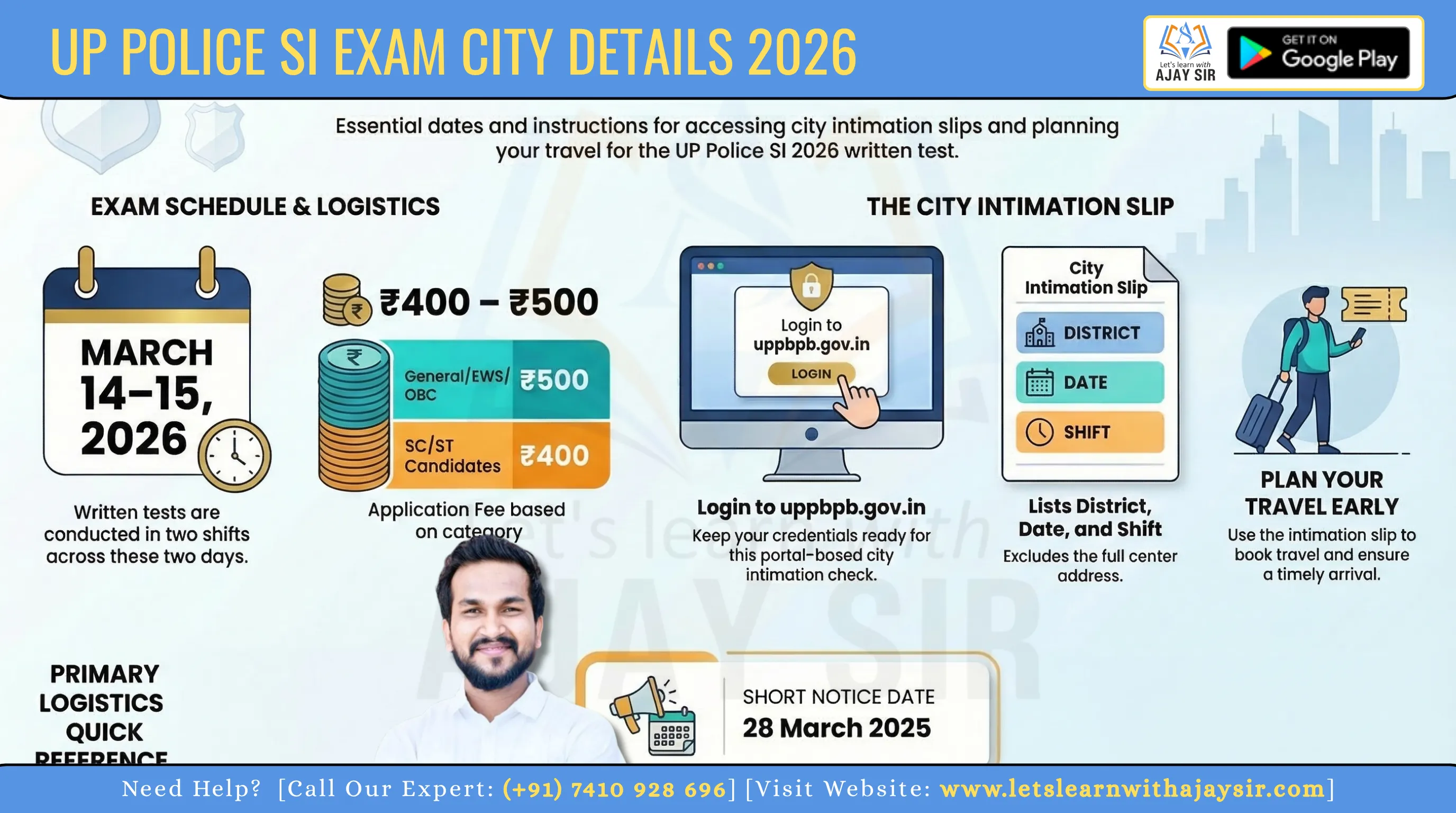
You’ll find a short intimation slip online at uppbpb.gov.in that names the allotted district, the date and your shift. This is a login‑based update, so keep your credentials ready to view the slip and note the March dates: the written test runs on 14–15 March 2026 in two shifts.
Remember, the intimation slip gives the exam city and shift but not the full centre address or roll number. Use this notice to book travel and plan arrival times so you reach on the day refreshed and on time.
Key Takeaways
Check the official website first to view your city intimation slip.
The slip lists district, date and shift — not the full centre address.
Written tests are scheduled for 14–15 March 2026 in two shifts.
Keep login details handy; checking is a portal‑based action.
Use the intimation to plan travel and avoid unofficial sources.
All Details
UPSI exam overview: post, vacancies, and candidate volume
Before you finalise travel or revision plans, check the recruitment snapshot so you know the scale you face.
Recruitment board and advertisement reference
The selection is managed by the Uttar Pradesh Police Recruitment and Promotion Board, the promotion board that runs this recruitment. Note the advertisement reference: PRPB-B (Sub Inspector Cadre) - 03/2025. Keep this for your application records and correspondence.
Vacancies and registered candidates snapshot
You are competing for 4,543 vacancies for the post of sub inspector. A total of 15,75,760 candidates registered, so the ratio shows the scale of competition and why early planning matters.
Exam mode and scale across the state
The selection is conducted offline using OMR sheets, so practise time management and carry permitted stationery. Tests run across 75 districts in Uttar Pradesh, which explains district clustering for allocation.
Organisation: Uttar Pradesh Police Recruitment and Promotion Board
Mode: Offline (OMR-based)
What matters now: application identifiers and allotted date/region before centre address appears on the admit card
"Know the numbers: vacancies, registrations and the mode — they shape your plan."
Item | Value | Why it matters |
Organisation | Uttar Pradesh Police Recruitment and Promotion Board | Official authority for recruitment promotion and notices |
Post & Adv. No. | Sub-Inspector; PRPB-B (Sub Inspector Cadre) - 03/2025 | Match this with your application and communications |
Vacancies / Registered | 4,543 / 15,75,760 | Competition snapshot for candidates |
Mode / Coverage | Offline OMR / 75 districts | Plan travel and practise OMR technique |
Where to check your UP Police SI exam city online
Access the authorised portal to view your city intimation slip and plan travel in good time. Use the recruitment section on the official website so you avoid fake download pages and confusing links.
The link you need appears under the recruitment menu, usually labelled Exam City Intimation Slip/Admit Card. Log in with your credentials to view the slip and note your allotted district, date and shift.
Official website you should use to avoid fake links
Only visit uppbpb.gov.in for any recruitment notice. Check the domain, ensure the page shows a secure connection (HTTPS) and confirm the recruitment name matches your application before you log in.
What to look for in the recruitment section on the portal
Correct domain and secure padlock icon in the browser.
Clear label such as Exam City Intimation Slip/Admit Card.
Official notice or PDF link with formal board language rather than forwarded messages.
"Rely on the portal, not social forwards—official updates appear only on the site."
How to download the UP Police SI exam city intimation slip
A quick prep step is to keep your registration number and date of birth to hand before you visit the portal. This saves time when the link goes live and reduces login errors.
Login details you’ll need before you start
Have your registration number ready. The site may ask for your date of birth or your password, so check both. Keep a charged device and stable network for the 2026 download to avoid interruptions.
Step-by-step process to view and download the slip
Open the official website and go to the recruitment section.
Click the exam city intimation slip link and enter your credentials.
View the slip on screen, then choose download or print.
Save a local PDF copy and keep a cloud backup for travel planning.
What to do if the download link is slow or not loading
If the page stalls, try again in off‑peak hours. Switch browsers, clear cache or use mobile data for a steadier connection.
How you know the download succeeded: the slip should show your registration number, allotted exam city and the date/shift. Re‑open the saved PDF and check readability before you book travel.
"Download early, save multiple copies and always verify the key details."
Details mentioned on the UP Police SI City Intimation Slip 2026
Your downloaded slip summarises key personal and test allocation fields for quick verification.
Personal and application identifiers
Check your name exactly as registered and the application or registration number shown. These items prove your identity and must match your original records.
Allotted district, exam date and shift
The slip states your allotted district, the scheduled date and the shift. Note whether you have the 14 or 15 March slot and your morning or afternoon shift for travel planning.
Reporting time and key instructions
Reporting time and basic entry rules appear on the slip. Read these instructions so you arrive early and carry the permitted documents.
You’ll spot missing or mismatched details early and request corrections if needed.
Confirm identifiers match what you submitted during registration.
Understand district allocation to plan nearby travel and stay options.
Keep the slip safe as a planning document; the admit card will confirm the centre address.
"Verify every field on the slip — it guides your travel and avoids last‑minute surprises."
UP Police SI exam timings and shifts for 14-15 March 2026
Confirm your reporting slot early so you can plan travel, meals and rest with confidence. Small timing slips can cause big stress on the day, so note the schedule and act on it.
Morning shift reporting and exam time
Reporting: 8:00 am. Arrive at least 45–60 minutes early to clear security and locate your hall.
Exam window: 10:00 am to 12:00 noon. Use the gap between reporting and start to complete registration formalities and calm nerves.
Afternoon shift reporting and exam time
Reporting: 1:00 pm. Plan midday travel to avoid peak traffic and allow time for a light meal.
Exam window: 3:00 pm to 5:00 pm. Reach the centre early enough to handle checks and settle in comfortably.
You’ll see the shift structure for the police exam across both days, so align sleep and transit accordingly.
Treat reporting time seriously: late arrival may lead to denied entry under admit card rules.
Use shift info to estimate when to leave your accommodation and find the centre area early.
Always double-check your allotted shift on the slip or admit card rather than relying on hearsay.
"Plan your day around the reporting time — it shapes everything from travel to timing of your revision break."
Shift | Reporting time | Exam time |
Morning (Shift 1) | 8:00 am | 10:00 am – 12:00 noon |
Afternoon (Shift 2) | 1:00 pm | 3:00 pm – 5:00 pm |
Exam city and district coverage across Uttar Pradesh
Allocation uses regional clusters, meaning your allotted hub may serve several neighbouring districts.
How exam cities are mapped to district clusters
The board groups districts into hubs to handle the large candidate volume across 75 districts in uttar pradesh. This reduces travel strain and balances seat capacity at testing centres.
What this means for you: your assigned exam city may be a nearby major town rather than your home district. That hub will host candidates from several listed districts.
Examples of major hub groupings
Common groupings include Lucknow (Lucknow, Unnao, Rae Bareli, Sitapur, Hardoi, Lakhimpur Kheri) and Agra (Agra, Firozabad, Mathura, Mainpuri).
Other hubs are Prayagraj (Prayagraj, Kaushambi, Fatehpur, Pratapgarh), Kanpur (Kanpur Nagar, Kanpur Dehat, Etawah, Farrukhabad, Auraiya, Kannauj), Varanasi (Varanasi, Jaunpur, Ghazipur, Chandauli), Meerut (Meerut, Ghaziabad, Hapur, Bulandshahr, Baghpat) and Bareilly (Bareilly, Pilibhit, Budaun, Shahjahanpur).
You’ll see why your exam city might be a larger hub even if you applied from a nearby district.
Use the exam city slip to shortlist rail and bus options, and to estimate peak‑hour congestion around major centres.
Remember that the admit card will provide the exact centre address; this map is for planning only.
"Treat the allotted hub as your planning anchor — it helps you pick routes and lodging early."
City intimation slip vs admit card: what’s the difference for you?
One document tells you where to plan; the other lets you in — learn the difference now. Understanding both saves travel stress and stops entry problems on the day.
What the city slip confirms (and what it does not)
The city intimation slip confirms your allotted district and the scheduled date and shift. Use it to book travel and shortlist accommodation.
It does not include the exact venue address, roll number or the centre code. That means the slip is a planning tool only and not a pass for entry.
What the admit card adds: centre address, roll number, and entry rules
The admit card is the mandatory hall ticket. It shows your roll number, photo, exact venue address and all reporting rules.
Carry the admit when you arrive; officials will check it for entry and seating. Without it, you can be denied access.
What you must carry on the day
Printed admit card and a valid government ID as listed on the admit.
A hard copy of the city intimation slip helps with travel queries but is not enough for entry.
Permitted stationery and face mask if required by the centre rules.
"Treat the city slip as planning; treat the admit card as your entry pass."
Document | Confirms | Needed for entry? |
City slip / city slip 2026 | Allotted district, date and shift | No — planning only |
Admit card | Roll number, photo, exact venue and rules | Yes — mandatory |
Both saved copies | Backup if site access fails | Recommended |
Conclusion
Finish your planning by locking three simple actions: check the city slip, book travel, and save the admit card.
First, log in to the official website uppbpb.gov.in on or after 6 March to view the intimation slip. Next, arrange travel for the written test on 14–15 March and keep buffers for reporting time. Finally, download the admit card around 11–12 March and verify centre details.
Keep your registration details handy so you can access the portal quickly during peak traffic. Remember: the city slip is for planning; the admit card is mandatory for entry.
Watch notices from the recruitment promotion board so you spot any change in reporting rules, shift instructions or entry requirements.



![EMRS PGT [Tier-2] ENGLISH - 2025](https://letslearnwithajaysir.s3.ap-south-1.amazonaws.com/courses/FsnKxIFpiLxbRD418g6vo7AsLy0ge7IP7Iu2fsJY.webp)
![EMRS TGT [Tier-2] ENGLISH - 2025](https://letslearnwithajaysir.s3.ap-south-1.amazonaws.com/courses/BjLXVqVV1SeZKnhYjmPZpz2jQ7r02kS73pGGOLrL.webp)
![KVS/NVS PGT ENGLISH [Tier-2] - 2025](https://letslearnwithajaysir.s3.ap-south-1.amazonaws.com/courses/vqli598KWrKnm4txcsZh5qjMN9UMAX8LvFk9IiF0.webp)
![KVS/NVS TGT ENGLISH [Tier-2] - 2025](https://letslearnwithajaysir.s3.ap-south-1.amazonaws.com/courses/pxC2WhfYKuyaoGqvcTvhTBL2Y44o3TNA0z8NYRB5.webp)