• NEED HELP? TALK TO A COUNSELLOR: 7410928696

IB Security

Category: SSC Exams

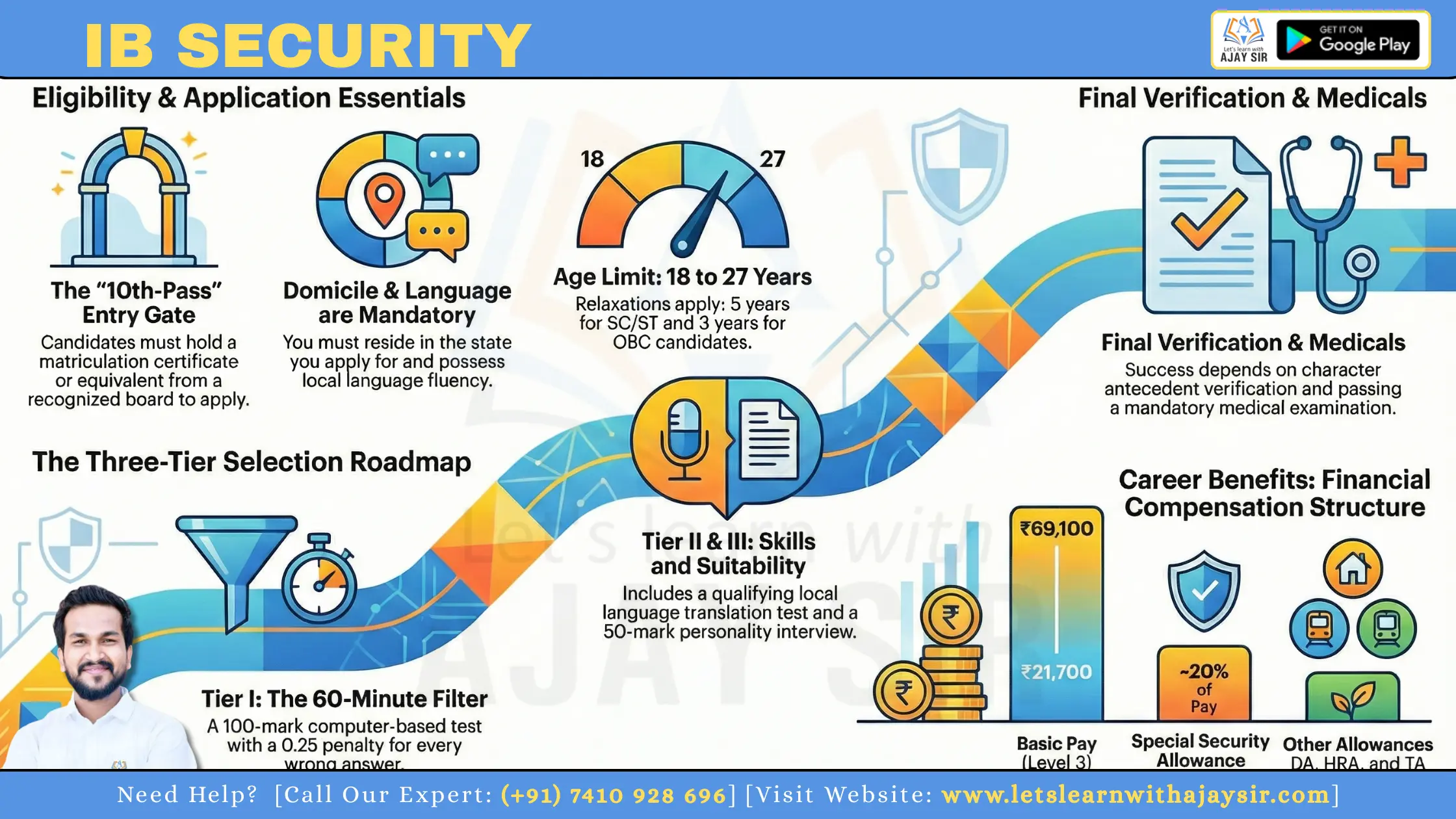
This guide shows you how to plan for the Security Assistant post with clarity and calm. You will learn the role fit, eligibility, application steps, fees, and the full selection path: Tier I (CBT), Tier II (descriptive and language) and Tier III (interview).

Tier I has 100 questions, 100 marks and 60 minutes, with a 0.25 mark penalty for wrong answers. Official updates appear on mha.gov.in and ncs.gov.in. Use this guide to focus on the Security Assistant recruitment only; comparisons are included only when they help your preparation.

Key Takeaways

  • Understand the selection stages and Tier I format to set real goals.

  • Focus on the Security Assistant role; avoid needless comparisons.

  • Track the official notification on mha.gov.in and ncs.gov.in.

  • Begin basics early: aptitude, general awareness and local language.

  • Gather documents and plan applications before deadlines.

Quick Overview

IB Security: What is IB Security Assistant role?

The Security Assistant role is a hands-on post that links office work to field operations. You will balance clerical duties with practical support for local intelligence activities.

Group ‘C’ (Non‑Gazetted, Non‑Ministerial) places you in a staff-level post under the ministry home affairs structure. That means routine accountability, following clear protocols and reporting to supervisors rather than policy making.

You can expect tasks such as field support, surveillance assistance, handling confidential records and liaison with local agencies. These duties need strict discretion and steady work discipline.

Language matters: your posting is normally tied to a state/UT vacancy, so candidates must show fluency in the local language or dialect. This is operationally important for information collection and smooth coordination on the ground.

  • Assess your fit: are you adaptable, discreet and ready to follow procedures?

  • Prepare while you study: practise secure note‑taking, read local news daily and keep a short revision routine.

IB Security: Overview

Before you apply, get a clear snapshot of the vacancy so your effort matches the right syllabus and timeline. The IB Security Exam 2026 title appears in official notices, but the role you aim for defines eligibility, duties and pay.

Security Assistant vs ACIO: don’t confuse the two notifications

The security assistant post usually needs a 10th‑pass qualification and follows a staff-level track. ACIO is a graduate-level recruitment with a higher pay band (Level 7: ₹44,900–₹1,42,400) and its own notification on mha.gov.in.

Exam content can look similar, yet the career path differs. Apply only to the notification that matches your education and career plan to avoid wasting time on the wrong syllabus.

Expected competition level and what past cycles suggest

Competition is high: many candidates apply, which makes cut-offs sensitive. The 2025 exam cycle showed large combined vacancies (~4,987 SA/Exe), so volume is significant and selection is state/UT dependent.

Tier I is worth 100 marks and carries negative marking, so accuracy matters. Aim beyond a bare pass; merit lists and shortlisting vary by state and category.

Decision cue: if you qualify for both posts, choose by timeline, your education level and whether you can meet Tier II language requirements. Structured preparation beats last‑minute cramming.

Application Fee

Recruitment processing charge ₹550 for all candidates.
General, EWS and OBC male candidates ₹650
Women, SC/ST and eligible Ex‑servicemen ₹100 Fee relief [still pay the ₹550 processing charge]

Eligibility Criteria

IB Security: Eligibility criteria

A quick eligibility audit saves time: check age, education, domicile and language in that order. This sequence prevents surprises and helps you plan document updates early.

Age limit and relaxations

The normal age limit runs from 18 to 27 years. The age is usually calculated on the application closing date, so verify the exact cut-off in the notification.

Common relaxations apply: SC/ST get 5 years and OBC get 3 years. Other government-notified categories also receive concessions; confirm wording in the official PDF.

Educational qualification

The basic educational qualification is matriculation (10th pass) or an equivalent recognised certificate from a board. If you are studying higher, you can still apply if you hold the 10th or equivalent recognised credential.

Mandatory domicile and language

Candidates must have a domicile certificate for the state/UT you apply to. Local language fluency (read, write, speak) is non-negotiable and is tested in Tier II.

  • Walk the eligibility criteria in order: age first, then education, then domicile and language.

  • If your domicile needs reissue or correction, start now to avoid missing the last date.

Vacancy Details

IB Security: Vacancies and state-wise allocation

Vacancies are published state‑wise, so choosing the right state is a tactical decision that affects your chance to qualify. You must match your documents and language skills to the vacancy table before you apply.

Why domicile drives allocation

The vacancy table shows UR/OBC/SC/ST/EWS quotas and local language notes. security assistant vacancies are tied to state domicile, and eligibility criteria will list exact proofs needed.

Category planning and cut‑off strategy

Plan your target marks with a buffer above likely cut‑offs. Look at past cycles — larger vacancy states like Delhi had higher counts but also strict language rules.

  • Verify UR/OBC/SC/ST/EWS breakdown and local language requirement.

  • candidates must hold correct domicile proof; avoid applying where you cannot prove it.

  • When two states look possible, choose the one where your documents and fluency are strongest.

Factor

Why it matters

Action

Vacancy size

Alters competition

Adjust marks buffer

Category split

Determines cut‑off patterns

Plan by category

Language rule

Can disqualify applicants

Confirm fluency and proof

Remember: vacancy count affects competition, but correct documents and exam performance decide the final outcome in any recruitment.

Syllabus

IB Security: Tier-wise exam pattern

Know the tier-wise exam pattern so you can plan study time and practise the right tasks. Below is a compact breakdown of each stage and the marks you must target.

Tier I: structure and sections

Tier I is 100 questions for 100 marks in 60 minutes. You must cover:

  • General Awareness — current events and static facts.

  • Quantitative aptitude — speed with basic arithmetic and DI.

  • Reasoning — numerical, analytical and logical ability.

  • English — grammar, comprehension and vocabulary.

  • General Studies — overlap with GA; focus on civic, economy and science basics.

Negative marking and accuracy strategy

Every wrong answer deducts 0.25 marks. Aim for accuracy over attempts. Skip questions you cannot narrow down to two options.

When to guess: only if elimination leaves two choices and time is short. Use timed mocks to refine when you should move on.

Tier II and Tier III: what they test

Tier II is qualifying: translation (local language ↔ English) for 40 marks and spoken ability for 10 marks. Balance literal accuracy with natural phrasing; practice short translations and read aloud.

Tier III commonly carries 50 marks for interview and personality assessment. Prepare current affairs, role scenarios and clear communication habits.

Stage

Marks

Purpose

Key focus

Tier I

100

Shortlisting

Speed, accuracy, section balance

Tier II

40 + 10 (qualifying)

Language proficiency

Translation practice, spoken fluency

Tier III

50

Suitability interview

Current affairs, communication

IB Security: Tier I shift timings and exam-day checklist

Your shift window sets the rhythm for travel, meals and nerves—plan it deliberately.

Reporting time versus actual exam time

Reporting time is earlier to allow document checks and frisking. If you reach only at the exam start, you may be barred even if you are inside the same hour.

Shift pattern (typical):

  • Shift I: report 07:00–08:00 — exam 08:30–09:30

  • Shift II: report 10:00–11:00 — exam 11:30–12:30

  • Shift III: report 13:00–14:00 — exam 14:30–15:30

  • Shift IV: report 16:00–17:00 — exam 17:30–18:30

What to carry and what to avoid

Follow your admit card instructions precisely. Carry a printed admit card, a valid photo ID and spare passport-size photos if asked.

Avoid electronic devices, calculators, pens with embedded storage, and bulky accessories. Keep pockets minimal to speed security checks.

"Check your route, arrive early and keep documents in one folder to reduce last-minute stress."

  1. Verify centre address, shift and any special entry notes on your 2026 admit card a day before the date.

  2. Plan meals to avoid heavy food close to the test; carry water in a sealed bottle if permitted.

  3. Keep documents, wristwatch (if allowed) and a simple stationery set in a single folder.

Item

Bring

Do not bring

Identification

Printed admit card, photo ID

Photocopies without original

Personal items

Passport photo, face mask

Mobile phone, smartwatch

Travel

Route plan, ID proof for travel

Unnecessary luggage

IB Security: Syllabus for Tier I and Tier II

Focus your study by splitting the syllabus into clear, testable blocks. That stops random revision and makes progress visible. Treat each block as a short checklist you can complete in a week or two.

General Awareness

Cover current affairs with daily notes and pair them with static topics: polity, economy, history, geography and basic science. Read one reliable paper and a monthly current‑affairs summary. Make 1‑page notes for quick revision.

Quantitative Aptitude

Prioritise quick‑win topics: percentages, ratio, averages, time & work and basic DI. Use timed sets of 10–15 questions to build speed. Add mensuration and simple algebra as follow‑ups.

Logical / Analytical ability

Practice series, coding‑decoding, blood relations, directions and puzzles daily. Reasoning improves most with repetition, so track error types and repeat problem sets until patterns feel familiar.

English

Focus on error spotting, cloze tests, comprehension and vocabulary from real reading. Short daily passages and vocabulary lists raise your accuracy quickly. Work on time‑bound comprehension drills.

Tier II language

For the language test, practise translation both ways (local ↔ English) and speak aloud. Emphasise meaning and natural phrasing, not literal word‑for‑word renderings. Mock oral rounds build confidence.

  • Use past question papers as a diagnostic: find weak areas, then practise targeted sets until your error rate drops.

Tick off sub‑topics as you master them to keep momentum and avoid repetition.

Salary

IB Security: Salary, pay scale, and special security allowance

A clear view of pay, allowances and progression helps you see the real value of the security assistant role. Pay sits in Pay Level 3 with a basic pay range of ₹21,700–₹69,100. Your actual starting basic pay depends on entry pay rules and increments.

Special security allowance commonly adds about 20% of your basic pay in referenced cycles. This allowance can noticeably lift your monthly in‑hand salary, especially in higher basic pay steps.

What affects your take‑home

  • Dearness Allowance (DA), House Rent Allowance (HRA) and Travel Allowance (TA) add to gross pay.

  • City classification (X/A/B) alters HRA, so posting city changes your bank credit.

  • Current DA rates and deductions (tax, PF) determine the final figure.

Component

Typical rate

Effect on pay

Basic pay (Level 3)

₹21,700–₹69,100

Base for allowances and pension

Special security allowance

~20% of basic

Raises monthly in‑hand significantly

Other allowances (DA/HRA/TA)

Variable

Depends on DA rate and city

Deductions

Tax, PF

Reduce net salary

Career progression

After joining, you can progress to Senior Security Assistant and, through departmental promotion, move to posts such as ACIO‑II. Consistent performance, training and vacancies drive promotion prospects.

Selection Process

IB Security: Selection process

Clear stages keep your effort focused. The selection process has four linked steps: Tier I CBT, Tier II descriptive and language tests (qualifying), Tier III interview/personality test and final formalities that include character antecedent verification and medical examination.

Tier I as the screening round

Tier I is the main filter. Your speed and accuracy here decide whether you reach the next stage.

High accuracy reduces negative marking and improves your shortlist chances. Treat practice tests as the core of your strategy.

Tier II: descriptive and language qualifying gate

Tier II checks written translation and local language ability. It is qualifying: marks usually do not add to merit but failure knocks you out.

If you neglect local language practice, you risk being eliminated despite a strong Tier I score.

Tier III: interview and personality assessment

The interview tests composure, awareness, communication and judgement relevant to an intelligence‑support role. Panel members assess whether you suit field and office duties.

Merit is typically formed from Tier I plus Tier III performance, so start interview prep once you clear Tier I.

Character antecedent verification and medical examination

Final selection depends on clean character antecedent verification and passing the medical examination. Consistency in documents, addresses and past records is essential.

Keep originals of identity, education and domicile proofs ready and maintain a sensible online presence.

  1. Clear Tier I (screening).

  2. Pass Tier II (qualifying language test).

  3. Attend Tier III (interview/personality test).

  4. Complete character antecedent verification and medical examination.

  5. Final selection announced based on merit and clearances.

Stage

Purpose

What you must do

Tier I (CBT)

Shortlisting by score

Build speed, accuracy; take mock tests

Tier II (Descriptive + Language)

Qualifying for language and writing

Practice translation and spoken tests

Tier III (Interview)

Assess personality and suitability

Prepare current affairs, role scenarios, soft skills

Final formalities

Verify antecedents and health

Keep documents ready; pass medical checks

How to Apply

IB Security: Application form walkthrough

A careful walk-through of the application form saves time and prevents disqualification. Apply only through the official online portals: mha.gov.in or ncs.gov.in. When the notification is live, follow these steps calmly and steadily.

Registration essentials

Register with a mobile number and email you will keep active until the final list. Use your legal name and the exact date of birth as on your certificates.

Why this matters: typo errors in name, category or state/UT can cause verification failure. Double-check each field before you move on.

Document uploads: photo and signature

Prepare files that meet the upload specs. The photo should be 35mm x 45mm and 100–200KB (JPG/JPEG). The signature should be 80–150KB (JPG/JPEG).

File

Size

Format

Photo

100–200KB

JPG/JPEG, 35mm x 45mm

Signature

80–150KB

JPG/JPEG

Other documents

As per PDF

PDF/JPG

Final preview, submission and printing

Use the final preview as a last audit before payment—post-submission edits are often limited. Save your application number immediately.

  1. Note the application number and take a screenshot.

  2. Save the payment receipt and download the submitted form as a PDF.

  3. Keep a printed copy for admit card checks and document verification.

Tip: if the last date approaches, submit early to avoid upload failures or payment timeouts. Candidates must keep all proofs until the recruitment completes.

All Details

IB Security: Admit card 

Look for the admit card on the official portal first; the registered email often carries a separate download link. You log in using the credentials you created during the application form step — usually your application number and password or date of birth.

Where the link appears and how login works

The link typically appears on the recruitment page of the official site and may be mailed to registered candidates. Use your application number, the password you set and the security captcha to access the download page.

Common download problems and quick fixes

Slow server or timed-out pages: try in off-peak hours or use a different browser. Wrong credentials: check your application form email and try the 'forgot password' option. Browser issues: clear cache, disable extensions or switch to Chrome/Edge.

What to verify on your admit card before you travel

Check these fields carefully:

  • Your full name and photograph match your photo ID.

  • Category (if shown), exam centre address and city.

  • Shift timing, reporting time and the exact date.

  • Any special instructions or required documents.

Why matching details matter: centres strictly verify that the admit card and photo ID belong to the same person. Mismatch can lead to denial of entry.

Travel and printing advice

Plan your route to the centre and allow a buffer for traffic. Print at least two copies of the admit card and keep a digital screenshot. Carry originals of your photo ID and a couple of spare passport photos if the centre asks.

What to do if something is wrong

  1. Take screenshots and save the error page or the incorrect admit card copy.

  2. Check the official FAQ or notices on the recruitment portal for guidance.

  3. Contact the helpline or email support provided in the notification, quoting your application number and the issue.

"Document issues resolve faster with screenshots, the application number and prompt contact via the official helpline."

Problem

Likely cause

Immediate fix

When to escalate

Cannot log in

Wrong credentials or locked account

Use 'forgot password' or wait 15 minutes

If reset fails, contact support with application number

Page times out / server busy

High traffic on the site

Try later, change browser or use mobile data

If admit card unavailable after 24 hours, notify helpdesk

Incorrect name/photo

Upload error or data mismatch

Compare with your application form and take screenshots

Escalate immediately with proof and application number

Centre/shift wrong

System error or wrong selection at application

Re-check application form details and print both copies

Contact officials before the reporting date to seek correction

Related IB recruitments

When recruitment notices arrive, several related posts may appear at once. You should scan each notification carefully so you apply only where you meet the eligibility and can commit to the selection timeline.

ACIO snapshot: eligibility and pay differences

ACIO is run by the ministry home affairs and normally requires a graduate degree. The pay sits in Level 7 (₹44,900–₹1,42,400), which is substantially higher than many staff‑level posts.

The selection pattern has an online Tier I, an offline Tier II that tests writing and comprehension, and a Tier III interview that can carry 100 marks. Choose this track only if you meet the higher educational qualification and are prepared for extended written work.

Security Assistant Motor: a separate track

The Motor recruitment follows a different path. Typical eligibility includes 10th pass plus a valid driving licence and at least one year’s driving experience.

Selection may add a driving test, document verification and a medical. Timeline examples show how swiftly city slips, admit cards and the written test can follow one another, so stay alert to official updates.

How to decide which track suits you

Pick a track by matching your educational qualification, willingness for skill tests (for motor posts) and the age limit for each notification.

Practical checklist:

  • Confirm the exact age limit and educational qualification in the notification.

  • Note selection stages — driving tests or extended descriptive papers change preparation plans.

  • Double‑check post name, fee rules and document needs before you start the application form.

Post

Key eligibility

Selection highlights

ACIO

Graduate

Tier I online; Tier II offline (essay/comprehension); Tier III interview (100 marks)

Security Assistant (Motor)

10th pass + driving licence + 1 yr experience

Written test + driving test + DV + medical; faster timeline example available

Security Assistant (General)

10th pass; local language fluency

Tier I CBT; Tier II language qualifying; Tier III interview

"If multiple notifications are live, pause before you apply: verify post name, age limit and required documents to avoid mistakes."

Conclusion

Close your plan with a few steady steps to turn preparation into selection.

Track the official notification, confirm eligibility and complete the application accurately. Prepare Tier I (100 questions, 60 minutes, 0.25 negative marking), keep Tier II language practice current, and build interview confidence for Tier III.

Practical actions now: gather domicile and ID proofs, start concise current affairs notes, and set weekly targets with disciplined mocks. Remember, candidates must practise accuracy under negative marking and not ignore the local language test.

Checklist: bookmark mha.gov.in and ncs.gov.in, set reminders around the expected July–September window, save payment receipts and application proofs. If you stay consistent, you can reach the required marks and handle each selection stage calmly, one step at a time.

FAQs

You’ll work in a Group ‘C’ post supporting field operations, surveillance assistance, record maintenance and liaison duties. Tasks often include local coordination, reporting and routine surveillance support where knowledge of local language and area helps you perform better.

The Security Assistant post is an entry-level Group ‘C’ role focused on field and clerical support. ACIO roles are officer-grade, carry greater responsibilities and higher pay. Don’t confuse the two notifications when you apply; each has distinct eligibility, pay scale and selection stages.

Monitor the Ministry of Home Affairs website and the National Career Service portal for the official PDF notification, application link and corrigenda. These PDFs contain post details, scheme, application instructions and state-wise vacancy lists.

The notification usually lists vacancies, eligibility criteria, age limits, educational qualification, application fee, exam pattern, selection process, important dates, and document requirements for verification and medical tests.

The notification announces the application window, fee payment deadlines, admit card release and exam windows. Expect a multi-stage schedule: Tier I first, then Tier II and Tier III. Results and further stage dates follow in weeks to months depending on volume.

Vacancies are state-wise and often tied to domicile rules. Your home state choice affects eligibility and competition. Category-wise reservation is applied, so plan your cut-off target according to historical state trends.

Key requirements include the prescribed age limit with applicable relaxations, minimum educational qualification (10th pass or equivalent recognised board), domicile certificate where required and proficiency in the local language of the posting.

Register with a working mobile number and email, fill all fields accurately, upload scanned photo and signature as per specifications, preview the form carefully, submit and print a copy. Mistakes in personal data can cause disqualification during antecedent verification.

Fees typically apply to General/EWS/OBC male candidates, with exemptions or concessions for women, SC/ST and eligible ex-servicemen. You can pay online or via designated bank challan; keep payment proof for records

Selection starts with Tier I CBT for screening, followed by Tier II language/descriptive tests and Tier III interview or personality assessment. Final stages include character antecedent verification and a medical examination before appointment.

Tier I usually has 100 objective questions for 100 marks to be completed in 60 minutes. Sections include General Awareness, Quantitative Aptitude, Logical/Analytical Ability, English and General Studies. Negative marking applies, so accuracy matters.

Tier II focuses on language ability and translation and is often qualifying. Tier III assesses personality, communication, and suitability; interview marks contribute to final merit along with earlier stages.

Carry your printed admit card, a valid ID proof and any documents listed on the admit card. Avoid electronic devices, study materials and banned items. Follow reporting time strictly as per the admit card instructions.

Prepare General Awareness (current affairs, polity, economy, history, geography, science), Quantitative Aptitude (percentages, ratio, time & work, DI), Logical/Analytical ability (series, puzzles, coding-decoding), English (grammar, comprehension, error spotting), and Tier II language translation practice.

Build a weekly timetable prioritising Tier I weightage, take timed mock tests, analyse mistakes, and use past papers to spot recurring themes and question formats. Regular current affairs revision and local language practice are essential.

Download from the official portal using your registration credentials when the link is active. Verify your name, photograph, exam centre and time. Contact the helpdesk immediately if details are incorrect.

The post is normally in Pay Level 3 with the notified pay range and allowances. You may receive a Special Security Allowance and other applicable benefits; these affect your take-home pay. Career progression pathways lead to higher grades over time.

Yes. Officer-level ACIO vacancies, motorised Security Assistant posts and similar Ministry of Home Affairs recruitments often appear alongside. Each has distinct eligibility, selection process and pay scale, so choose the track that matches your profile and timeline.

Authorities verify your background, residence history and conduct police verification to confirm character antecedents. The medical exam checks physical fitness per prescribed standards. Clearance is mandatory for final appointment.

Welcome to Let's Learn with Ajay Sir — Your trusted platform for mastering English Grammar and Literature. We are dedicated to providing high-quality educational content, insightful articles, interactive quizzes, and the latest exam updates to empower learners at every level. Join us on this enriching journey toward academic excellence and lifelong learning.